What is a Homeschool Report Card Template?

Try the 10-Minute Weekly Reset
Already tried a spreadsheet or an app that didn't stick? This free checklist is built for a week with more than one grade in it — the exact method from the HomeschoolPlanHub system, no card required.
or see every option, free to $49 — See Pricing
A homeschool report card is a periodic progress document that shows what your student studied and how well they did over a set period, typically one quarter or semester. Unlike a transcript, which cumulates your student’s complete high school record, a report card is a snapshot of a single term. You create and issue it yourself, no outside approval needed. Many homeschool families use report cards to track progress, document learning for sports eligibility or outside programs, or simply reinforce the rhythm of a school year even when your family runs on your own schedule.
What exactly is it?
A homeschool report card is a document you design and issue to record academic progress over a defined period. It sits between daily work and a final transcript. It’s more formal than a simple checklist, but narrower in scope than a cumulative high school record. Most report cards include the subjects or courses your student studied that term, grades or marks in each subject, attendance or instructional hours, and a space for your comments on progress or effort. A report card takes an afternoon to create from scratch; a transcript typically takes much longer because it requires pulling data from four years of records.
The key distinction is timing and purpose. You issue a report card periodically (quarterly or semester) to show one term’s work. You issue a transcript once or a few times, usually after high school is complete, to show the full picture for college or employer review. Both documents coexist in a complete homeschool record. The homeschool transcript template carries your student’s cumulative grades and credits. The report card carries the term-by-term snapshots that lead up to it.
Do you need to issue one?
No, unless your state’s homeschool laws require it or an outside program your student joins demands one. Many homeschool families track progress informally and skip formal report cards entirely. The choice is yours based on what serves your family’s needs and your record-keeping style.
That said, report cards do offer concrete benefits. If your student plays sports or joins a club through a traditional school, the program often asks for a current report card or transcript to verify progress and GPA. If you use an umbrella school or a hybrid program, they may issue report cards for you, or they may expect you to provide one if your student attends part-time. Some families appreciate the structure of issuing report cards twice a year because it creates clear checkpoints and gives families a rhythm similar to a traditional school calendar. Others use report cards primarily as a parent-facing record-keeping tool, never printed, just a way to organize term grades before rolling them into the final transcript. A few families issue report cards as a motivational tool for students who respond well to formal feedback at set intervals. None of these reasons are required; they are optional benefits that depend on your family’s situation.
What grading scales work for homeschool report cards?
You can use any grading scale you choose. Common options include letter grades (A through F), numeric scales (100-point or GPA-style), descriptive language (Excellent, Satisfactory, Needs Improvement), or checklist-based marks (Mastered, Developing, Not Yet). Pick the scale that matches how you grade coursework throughout the term.
For elementary report cards, descriptive scales and checklists work well because they capture skill development without creating grade anxiety. For middle school, many families transition to letter grades or numeric scores to prepare for high school record-keeping. For high school, use a scale that will eventually transfer to your transcript, typically letter grades or numeric equivalents, since colleges expect a recognizable grading method. Regardless of what you choose, the scale you use on report cards should match the scale you record on the final transcript. If you grade a course as “A” for a report card in fall, that same course should show as “A” (or its numeric equivalent) on the high school transcript issued later. Switching grading scales mid-stream creates confusion when you aggregate records.
What fields should your report card include?
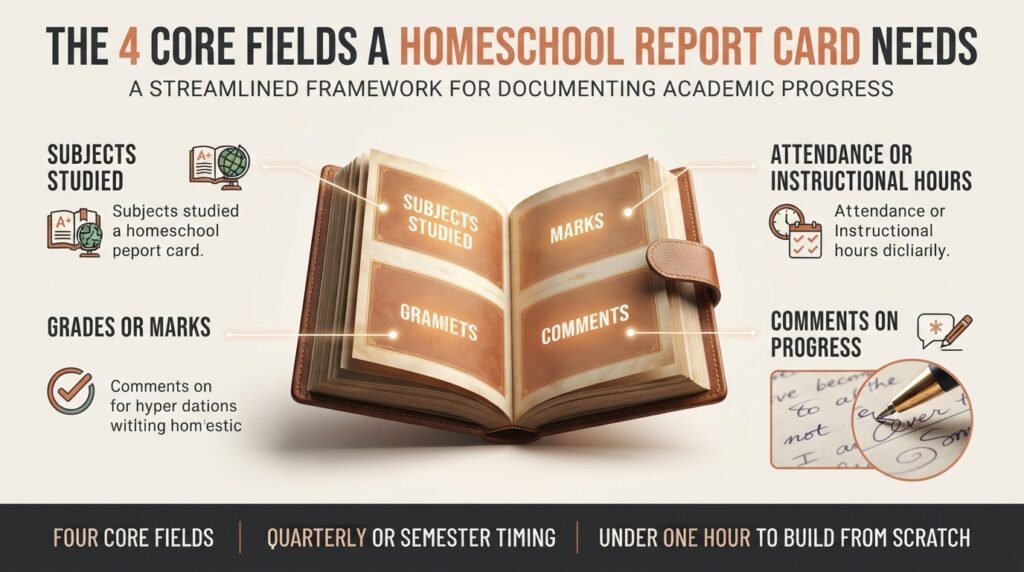
A basic homeschool report card needs four core sections: subjects or courses studied, grades in each subject, attendance or hours of instruction, and space for your comments. Everything beyond those four is optional, though many families add one or two of these extras.
The subjects section lists what your student studied that term: math, English, science, history, electives, whatever your curriculum included. Name the actual courses or topics so the report card stays specific to that term. The grades section shows how your student performed in each subject, using the grading scale you chose above. The attendance or hours section can be as simple as “120 hours of instruction completed” or as detailed as “absent 3 days, completed 95% of scheduled lessons.” The format depends on whether you track attendance or total hours, which itself depends on your state’s requirements and your personal preference. See homeschool requirements by state for what your location requires you to document.
The comments section is where you note progress, attitude, or areas to work on next term. This might be a sentence or two per subject, or a paragraph if something significant happened: a breakthrough moment, a struggle you want to address, a skill the student mastered unexpectedly. Comments transform a report card from a bare list of grades into a real progress snapshot.
Many families also add a habits and behavior section where you can mark effort, participation, responsibility, or attitude. This is not about policing character; it is about recording whether the student showed up ready to learn and engaged with the material. Some report cards include a skill checklist instead of or alongside grades, marking off skills like “reads independently,” “writes multi-paragraph essays,” or “solves word problems.” This is especially useful for younger students. A few families add a strengths and growth section, naming one thing the student excelled at and one thing to improve, to keep feedback balanced and forward-looking.
How do you create a report card from scratch?
Start with your grading scale and subject list, then build the template in whatever tool is easiest for you: a word processor, a spreadsheet, or a design tool like Canva. You do not need to start from a downloadable template unless you want to.
Step 1: Decide on your grading scale and period. Will you grade quarterly (four times a year) or semester (twice a year)? Will you use letter grades, numeric scores, descriptive language, or skills-based marks? Write this down so you remember it when issuing the next report card.
Step 2: List your subjects. Write down every subject your student studied during this term. Include the course or unit name if it is specific: not just “Math,” but “Algebra 1” or “Math 4A.” Specificity helps you track progress later.
Step 3: Create the document structure. Open a blank document and create a simple table or form. Include columns for: Subject, Grade, Comments. You can add Attendance Hours, Habits, or Skills if you want those sections. Keep the design clean and easy to fill in. Fancy borders and colors are optional.
Step 4: Add your student’s name and the term. Write the student’s full name at the top, the term (Fall 2024, Spring 2025), and the grading period (dates of the term). Include your name or signature line as the parent or teacher of record.
Step 5: Fill in the grades. Once the term ends, enter each subject’s final grade based on your accumulated work. Average assignments and assessments using whatever method you used during the term, or make a holistic judgment if you track work informally. The grade should reflect the student’s performance across the entire term, not just recent work.
Step 6: Add comments. Write a sentence or two per subject (or per habits category) that captures something real about the student’s progress that term. Did they master a new skill? Struggle with a concept? Show improved effort? Start improving their note-taking? These comments ground the report card in reality and make it useful as a record later.
Step 7: Sign and date it. Sign the report card as the parent or educator responsible for the student’s education, date it, and optionally have the student sign it too. This small ritual reinforces that the report card is an official document, not a casual checklist.
How often should you issue them?
The two most common schedules are quarterly (four times per year, roughly every nine weeks) and semester (twice per year, roughly every 18 weeks). Some families issue them once a year; a few issue them monthly. The frequency you choose should match your record-keeping rhythm and your family’s needs.
Quarterly report cards mirror a traditional school calendar closely and create four clear progress checkpoints a year. They work well for families who like structure or whose students join traditional programs part-time. Semester report cards align with a two-term school year, require less paperwork, and give longer stretches to master skills without the pressure of constant formal check-ins. Annual report cards are the minimum, issued once at the end of the school year, and work for families who prefer informal tracking. Monthly reports are rare but can help highly structured families or students who benefit from frequent feedback. Once you choose a schedule, stick with it. Consistency matters more than frequency. A family that reliably issues semester reports twice yearly will have a cleaner record trail than a family that issues reports randomly whenever they feel like it.
| Report Card | Transcript | Progress Tracker | |
|---|---|---|---|
| What it shows | Term-by-term grades and progress | Complete high school record and final grades | Daily or weekly skill development |
| Frequency | Quarterly or semester | Issued after course completion | Ongoing, weekly or monthly |
| Scope | Single term only | Four years of high school | One subject or skill at a time |
| Audience | Family, outside programs, motivation | Colleges, employers, scholarships | Parent and student reference |
| Required detail | Grades, attendance, comments | Course names, credits, final grades | Daily notes, percentage completed |
How do colleges view them?
Colleges do not typically ask to see homeschool report cards. They ask to see transcripts, which show the cumulative record. However, report cards can be useful if they are part of your supporting documentation during the admissions process. A strong report card showing consistent progress can be included with your transcript to give admissions officers additional context, especially if your homeschool’s transcript format is unconventional or if you want to highlight effort or improvement in specific terms.
Some highly selective colleges ask homeschoolers for supplemental documentation like course descriptions or a letter explaining your grading scale. A well-maintained report card history can make writing that letter easier and more credible: you are not reconstructing grades from memory, you are pulling from documented records issued at the time. The real value of report cards for college-bound students is not that colleges demand them, but that they make your final transcript stronger by showing term-by-term progress and consistency.
What does a completed homeschool report card look like?
Here is an example of a simple, complete homeschool report card for a high school student, Fall term:
SAMPLE REPORT CARD
Student: Sarah Martinez
Term: Fall 2024 (August 28 – December 13)
Issued by: Maria Martinez, Parent-Educator
| Subject | Grade | Comments |
|---|---|---|
| English 10 (Great Books) | A | Sarah engaged deeply with classic literature and wrote thoughtful essays connecting themes across texts. Completed all reading assignments on time. Strong improvements in essay organization. |
| Biology 1 | B+ | Solid understanding of cell structure and photosynthesis. Struggled initially with math calculations in stoichiometry but improved significantly after targeted review. Lab reports show careful observation. |
| Algebra 2 | B | Grasps concepts well; needs more practice with word problems. Homework completion was 90%. Participated actively in our twice-weekly review sessions. |
| History 2 (Medieval Europe) | A | Excellent research and presentation skills shown in the term project on feudal systems. Sarah took initiative finding primary sources. Ready to advance to independent historical analysis. |
| Elective: Spanish 1 | B- | Building vocabulary and conversational skills steadily. Needs more practice with verb conjugations. Attendance at online lessons was consistent (18 of 18). |
Attendance: 135 instructional hours completed (meets state minimum of 110 hours).
Habits: Effort A, Organization B, Participation A, Responsibility A. Sarah was self-directed in managing her schedule this term.
Overall Notes: Strong first term of high school. Sarah engaged with the material and showed genuine curiosity, especially in English and history. Areas to watch: she can sometimes rush through math without checking her work. Next term we will build in a check-in step for problem-solving.
Issued: December 15, 2024
Maria Martinez (Signature)
This example shows all the key elements: student name, term dates, specific course names, letter grades, meaningful comments, attendance hours, a habits summary, and overall observations. This report card captures a real student’s term in a way that is useful both as immediate feedback and as a historical record later.
Frequently asked questions
What is a homeschool report card template?
A homeschool report card documents term-by-term academic progress for your own records, to meet outside program requirements (sports leagues, hybrid schools), to help motivated students track progress, or to maintain a complete record before finalizing a high school transcript. It serves as a bridge between daily coursework and the final transcript, showing progress snapshots along the way rather than just a cumulative final record.
Is a homeschool report card the same as a transcript?
No. A report card shows one term’s work and is issued periodically throughout high school. A transcript shows all four years of high school, issued after the student completes their program. Transcripts go to colleges and employers. Report cards are primarily for family and outside program use. A transcript summarizes and finalizes data; a report card documents it as it happens.
Can you make your own homeschool report card, or do you need a template?
You can absolutely make your own. A homeschool report card is a document you control entirely, with no outside approval needed and no formatting requirements beyond clarity and accuracy. You can design one from scratch in a word processor in under an hour. Downloadable templates save time if you prefer a head start, and Canva offers free customizable homeschool report card templates if you want a polished design. The best report card is the one you will actually use and update consistently.
Does your state require homeschool report cards?
Most states do not require report cards. Some states require attendance records or instructional hours documentation, and a few require progress reports to be submitted to a school district or oversight agency. The requirement varies by state and sometimes by school district within a state. Check your state’s specific homeschool requirements to see if formal report cards are part of your legal record-keeping obligation. If your state does require them, use that requirement as your structure. If not, it is entirely optional.
Should your student sign the report card?
It is optional. Some families have the student sign to build ownership and acknowledge the feedback. Others leave it as a parent-issued document. This is a personal choice based on your family’s approach to feedback and accountability. For younger students, a signature might feel overly formal. For older students preparing for independence, it can be a meaningful ritual. Either way is fine.
What if your student’s grades are not what you expected?
The report card is a reflection of performance that term, not a judgment of the student’s worth. If grades are lower than expected, the report card comments are where you note what happened: a topic the student struggled with, a subject that needed more time, external circumstances that affected focus. Use the report card as a diagnostic tool to identify what to adjust next term, whether that is pacing, support, curriculum, or a different grading approach. The goal is not a perfect report card; it is an honest one that helps you and your student learn and improve.
Can you issue grades without issuing a formal one?
Yes. Many homeschool families grade coursework and record grades on a spreadsheet or in a simple notebook without ever printing a formal report card. This is especially common for families who do not need report cards for outside programs or college prep. As long as you have grades, course names, and dates recorded somewhere, you have the data you need to create a transcript later. A formal printed report card is one way to organize that data, but not the only way.
Get organized with the HomeschoolPlanHub planner
If periodic progress tracking appeals to you but you have struggled to stay organized, a homeschool planner can simplify the work. The planner includes built-in spaces to track attendance, log grades as you complete assignments, and organize course information in one place. This makes it far easier to generate accurate report cards at the end of each term because you are not searching through notebooks trying to reconstruct what happened three months ago. With records organized from day one, both report cards and final transcripts become straightforward to create when you need them.
Try the 10-Minute Weekly Reset
Already tried a spreadsheet or an app that didn't stick? This free checklist is built for a week with more than one grade in it — the exact method from the HomeschoolPlanHub system, no card required.
or see every option, free to $49 — See Pricing