Homeschool Teacher Planner: What Makes One Actually Work?
Try the 10-Minute Weekly Reset
Already tried a spreadsheet or an app that didn't stick? This free checklist is built for a week with more than one grade in it — the exact method from the HomeschoolPlanHub system, no card required.
or see every option, free to $49 — See Pricing
Most homeschool parents search for a homeschool teacher planner not because they want a product designed for homeschool, but because they’re wondering if they can adapt a classroom teacher planner like Erin Condren, Happy Planner, or Plum Paper for their needs. The question is honest. Can a planner designed for teaching one subject to 30 kids in a brick-and-mortar school work for teaching three kids at three different grade levels in your living room?
The short answer is: a homeschool teacher planner can work if you’re willing to customize and navigate around its gaps. But the longer answer is more useful. A planner built specifically for homeschool will serve you far better because it’s designed for the actual demands of multi-grade, multi-child instruction at home.
This guide walks through how classroom teacher planners work, where they fall short for homeschooling families, and what to look for when comparing a classroom planner against a purpose-built homeschool teacher planner.
What is a classroom teacher planner designed for?
Some teacher planner brands, including Erin Condren, now sell a version labeled specifically for homeschool, with attendance pages for up to four children and basic curriculum logging. Others, like a standard Happy Planner or Plum Paper teacher edition, are built for a classroom and stop there: one teacher, one class period at a time, a grade book for 30 students, parent communication notes, and a calendar that follows a school district’s August-to-May year.
Even the homeschool-labeled versions, though, are built by companies whose core product is personal planning and paper goods, not homeschool compliance or multi-grade instruction. So, the underlying structure still assumes a few things a homeschool household doesn’t match: a single grade level’s worth of lessons per day, a grade book instead of an hours-based attendance log, and no dedicated section for building a high school transcript.
These planners solve their own problem well. They have beautiful paper, thoughtful layout, and motivational design that makes planning feel like part of self-care rather than a chore. Indeed, the physical quality alone is why parents love them. However, here’s the key limitation: even a “homeschool” edition from a general stationery brand is not the same as a homeschool teacher planner built around how multi-grade households really run their week.
How is the homeschool reality structurally different?
Homeschooling is not a scaled-down version of classroom teaching. Instead, it’s a different operation entirely, and the gap shows up immediately when you sit down to plan.
Unlike classroom teaching, homeschool education doesn’t work with one grade group. Instead, you’re teaching multiple grades in the same week, often in the same afternoon. Meanwhile, your child who’s doing third-grade math is also doing kindergarten phonics, while your high schooler needs a completely different curriculum mapped to college-readiness standards. A classroom planner’s weekly layout, which assumes you’re teaching one subject five times a day to the same age group, doesn’t map to that reality at all.
Additionally, your calendar doesn’t follow a school district. You decide when to take breaks, when to add review weeks, and when your year ends. Perhaps you follow a traditional August-May schedule, or maybe you school year-round, or perhaps you split it into term-based blocks. A generic planner’s pre-printed calendar can constrain you instead of liberating you.
Furthermore, compliance documentation isn’t optional. Depending on your state, you need to track attendance by hours, document what subjects were covered and for how long, keep a portfolio showing real learning happened, maintain a reading log for submission, and (for high schoolers) track credits toward graduation and map out a transcript. A classroom teacher doesn’t do any of this. Your classroom planner has a grade book, which looks similar but solves a different problem entirely.
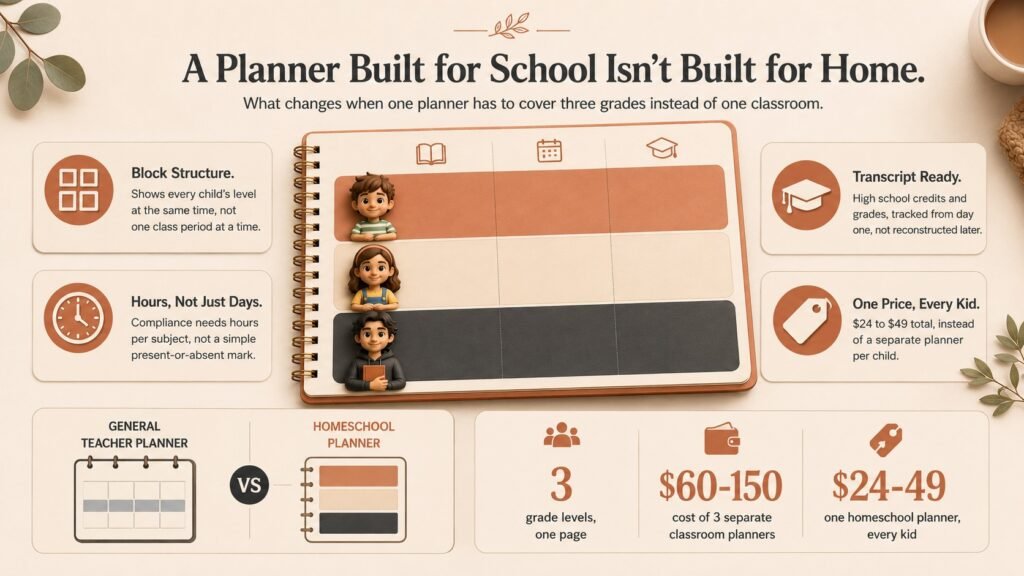
Finally, even a planner with room to log attendance for a few kids rarely solves the real logistical problem: showing what each child is doing at the same time, in the same week, at their own level. Some homeschool-labeled planners let you record that three kids attended school today. Fewer show you, at a glance, that a kindergartner is doing phonics while a seventh-grader is doing algebra during the same morning block. That’s the gap a homeschool teacher planner is built to close.
Where do classroom teacher planners show gaps?
Calendar structure
A classroom teacher planner comes with a printed calendar. So, you know exactly which weeks have school, when holidays fall, and whether next month has four weeks or five (for purposes of pacing your curriculum).
For homeschool, that calendar does three things wrong. First, it locks you into a school-year structure whether you want it or not. If you plan to school year-round or take a different break schedule, you’re writing over printed dates that don’t apply. Second, the calendar assumes district holidays (Labor Day, Thanksgiving week, winter break). Your state might follow a different schedule, or you might not care what the district does. Third, if you want to move a month of study to summer or break a term into uneven chunks, the calendar’s pre-printed structure works against you instead of serving you.
A purpose-built homeschool planner either has no dates printed (letting you start whenever you want) or builds in flexibility to adjust breaks and term lengths. Undated homeschool planners solve this outright. Even dated ones let you use them non-linearly, skipping weeks that don’t apply to your schedule.
Lesson planning for one teacher, one classroom
Classroom teacher planners organize by class period or subject. First, you have space to write the day’s math lesson, then the day’s history lesson, then the day’s language arts. It’s designed so a teacher can glance at the week and know exactly what’s happening in each slot.
However, that structure assumes you teach each subject once per day to kids at the same level. When you’re teaching three kids at three levels across five subjects a day in different rooms or at different times, the layout becomes confusing. Furthermore, you need to see at a glance: who does math when, who’s doing PE, who’s doing science with the older child, and who needs reading support. Unfortunately, a classroom planner’s daily layout doesn’t show that matrix.
By contrast, homeschool weekly planners use a different model. They show you the whole week in blocks. Core subjects get a block (literacy, math, science). Rotating subjects get a block (maybe history alternates with art). Flexible time gets a block (read-alouds, nature study, breaks). Then you assign each child to appropriate blocks. The structure changes from “what am I teaching now” to “who is doing what and when.” That’s the actual structure of homeschool, not a classroom transplanted to a house.
Attendance and compliance tracking
A classroom teacher doesn’t track attendance to prove a child spent 180 instructional days a year. The school does that. Instead, the teacher only notes which students were present or absent.
In contrast, state requirements vary for homeschool, but many states require you to document instructional hours. Some count by days (180 days minimum). Others count by hours (typically 900-1080 hours per year depending on grade). Still, a few require both. You need to track not just that you schooled, but how many hours, in what subjects, and for which child.
Similarly, a classroom planner has a grade book with rows for students and columns for dates. It works for marking attendance if all students attend together. However, if your kids are on different schedules (which they are), or if you need to track hours in addition to days, the grade book format breaks down. It’s simply not designed for “child A did 2 hours of math today, child B did 3 hours of reading, child C was sick.”
Fortunately, purpose-built homeschool planners include attendance and hours tracking that maps to state requirements. You can log by day or by hours. You can track multiple children. The layout acknowledges that each child’s schedule is independent.
High school transcript and credit tracking
Classroom teacher planners do not include space for transcript building. They’re not designed for that. Typically, a high school teacher enters grades. The school’s registrar builds the transcript and assigns credits per the school’s graduation requirements.
By contrast, when you homeschool high school, you are the registrar. You decide what counts as a course, how many credits it’s worth, whether it’s weighted, what the grade is. Moreover, you then have to document all of that so a college admissions office can evaluate it fairly. That’s a completely different task than entering homework grades into a grade book.
Notably, none of the classroom planners address this. A homeschool planner designed for high school includes space for course title, credits, grade, whether it’s honors or AP-level, and how it maps to state and NCAA requirements. That’s the actual work of homeschooling a high schooler.
Classroom teacher planner or homeschool teacher planner: how do they compare?
| Feature | Generic Classroom Planner (Erin Condren, Happy Planner, Plum Paper) | Purpose-Built Homeschool Planner |
|---|---|---|
| Calendar structure | Pre-printed school district dates | Flexible, undated, or adjustable |
| Multi-child capability | Some homeschool editions log basic attendance for a few kids | Full daily schedule per child, not just attendance |
| Daily layout | Assumes one subject taught at a time, sequentially | Shows all children and time blocks, visual matrix |
| Lesson plan space | One lesson per subject per day | Block-based planning (Core, Rotating, Flex categories) |
| Attendance tracking | Simple yes/no per child per date | Hours + days, by subject, per child, state-compliant format |
| Compliance documentation | Not included | Attendance tracker, reading log, field trip log, portfolio checklist |
| High school features | Grade book only | Transcript tracker, credit hours, course weighting |
| Multi-subject tracking | By class period | Integrated across all children’s simultaneous work |
| Cost | $20-50 per copy (3 kids = 3 copies if you want individual tracking) | $24-49 for one-child or family bundle covering all kids |
| Customization | High (great for personal style) | Guided (structured to match homeschool needs) |
The key insight: customization and beauty don’t fix a structural mismatch. An Erin Condren planner is gorgeous. You can write in it and make homeschool work. But here’s the catch: you’ll be constantly rewriting its structure to fit what you need, and you’ll probably fill it out less consistently because the layout doesn’t naturally match your workflow. In contrast, a homeschool teacher planner designed specifically for multi-grade instruction won’t require that translation step.
What should you look for in a real homeschool teacher planner?
When comparing a generic teacher planner against a purpose-built homeschool teacher planner, ask yourself these specific questions before buying:
Can it handle my actual family structure? If you have multiple kids at different levels, can the planner show you everyone’s schedule in one place, or does each child need a separate copy? A separate copy per child works if you have one kid. However, it becomes expensive and hard to manage at a glance if you have three. For that reason, look for a homeschool teacher planner that’s designed for multiple children in one volume.
Does the calendar match my school year? If you’re not following a traditional August-May schedule, or if you want to take breaks when you want them, does the planner force you to work around pre-printed dates, or does it let you start any time? Ideally, undated is the most flexible, but even a dated planner can work if you can skip weeks without it feeling wrong.
Is there space for compliance tracking? Look specifically for attendance/hours logged by date, by child, ideally with a total at the end of the week or month. If a planner has a grade book and nothing else, that won’t give you the documentation your state might require. A true homeschool teacher planner includes compliance fields by design.
For high school specifically: does it include transcript or credit tracking? If you’re homeschooling a high schooler and that child will apply to college, confirm the planner has dedicated space for course title, credit hours, and final grade. “Write it in the margins” doesn’t work for transcript building. That’s why a purpose-built homeschool teacher planner is essential for high school.
Does it reduce or multiply your paperwork? A good planner should consolidate everything you need into one place. If you still need a separate spreadsheet for hours tracking, a separate log for reading, and a separate tracking sheet for field trips, the planner isn’t actually reducing your work. A purpose-built homeschool teacher planner integrates all of that.
What does a week of planning with both types look like?
Imagine you have three children: a kindergartner, a third-grader, and a seventh-grader. All three have different curriculum needs. Your week has core subjects (math, language arts, science) that each child does at their level, plus some subjects everyone does together (history, art, read-alouds).
Using an Erin Condren, Happy Planner, or Plum Paper teacher edition, even a homeschool-labeled one, the daily page is still built around a single running list, not a block structure split by child. You’d end up writing Monday as “K phonics 9 am, 3rd math 9:30 am, 7th algebra 10 am, read-aloud 11 am” compressed into a small space.
By Friday, you’re not sure if your plan matches what happened, and your planner is crowded and hard to read. That’s the fundamental problem with using a general-purpose teacher planner as a homeschool teacher planner: it can log that school happened, but it wasn’t built to show three grade levels running at once.
In contrast, a purpose-built homeschool teacher planner shows Monday in blocks. Core subjects go from 9-11 am. Rotating subjects (history/art) happen from 11 am-12 pm. Flex time (read-alouds, nature study) runs from 1-2 pm. Then you assign each child to appropriate blocks. K student does phonics during core block, with read-aloud at 1 pm. 3rd grader does math and language arts during core block, history during rotating block. 7th grader does algebra and English during core block, history during rotating, plus their own independent reading during flex. All on one page, visually clear, easy to see if conflicts exist.
Later, when you log hours at the end of the week, the block structure becomes your attendance log. K student: 5 hours core, 1 hour flex. 3rd grader: 7 hours core, 1 hour rotating, 1 hour flex. You’re not reconstructing from memory or trying to add up cryptic notes. The structure that helped you plan becomes the structure that documents what happened. It does double work.
This illustrates the difference. A classroom teacher planner works if you’re willing to force-fit homeschool into its structure. However, a homeschool teacher planner is designed so the structure itself does the work for you.
What are common concerns when switching from a classroom planner?
“But I love the [Erin Condren / Happy Planner / Plum Paper] design.” You can keep using it if the structure works for your family. However, consider whether you’re paying for design or for function. A purpose-built homeschool teacher planner might not have gold foil or script fonts, but it will have the layout that lets you teach three kids at once. There’s a reason teachers who switch from classroom to homeschool planning say the structure change matters more than the aesthetics.
“Custom planners are expensive.” Classroom and homeschool-labeled planners from general stationery brands range from $20-50 each. If you’re homeschooling multiple kids and buying one per child, you’re spending $60-150 total. Meanwhile, a printable homeschool planner built as a family bundle costs about the same but covers all your children, includes compliance tracking, and doesn’t require you to invent a system to make it work. That’s the real value proposition of a homeschool teacher planner.
“I like being able to customize.” Classroom planners let you write whatever you want, which offers freedom. But for homeschool, being guided into the right structure is often more helpful than unlimited customization. A homeschool teacher planner that prompts you for “which child does which subject in which block” is less flexible, but you spend less time trying to invent a system that works.
Homeschool teacher planner FAQ
Deciding if you need a dedicated planner
What if I just use an app or spreadsheet? Some parents do, and there’s nothing wrong with that approach if it fits how you already think. Indeed, apps are flexible and let you sync across devices, useful if multiple people in the household need to see the plan. Meanwhile, spreadsheets give you total control over exactly how the data is organized. Both work. However, the tradeoff is that you have to build the structure yourself, deciding what columns matter and how to lay out multiple kids and subjects before you can even start using it day to day. If you know exactly what you need and you’re good with spreadsheets or apps, more power to you. Yet if you’d rather have a planner that already has the structure built in, purpose-built homeschool planners skip that step, saving the setup time for actual planning. This is a reasonable tradeoff for families who already think in spreadsheets.
Can I use a classroom planner successfully? Yes, if your family structure is simple, one or two kids, similar grade levels, no state compliance requirements, and you don’t mind customizing a format that wasn’t originally built for your situation. However, if you have three kids at three levels and your state requires attendance tracking, a standard classroom planner will make you work harder than necessary, fighting the format instead of just using it. That’s when a purpose-built homeschool teacher planner becomes essential, since it’s already structured around the exact complexity a classroom planner assumes doesn’t exist. A purpose-built planner becomes essential once state compliance and multiple grade levels add real complexity. To make a classroom planner work, create a separate color‑coded tab for each child and use sticky notes to overlay state attendance forms, which lets you keep the original layout while still meeting reporting requirements and you can quickly update daily without rewriting whole pages again.
Do I need a new planner every year? Not if it’s undated. Some families use one planner for multiple years, just filling in dates as they go, getting several years of use out of a single purchase. Dated planners become outdated after one school year, since the printed calendar dates only make sense for that specific year. Some families reuse them by skipping weeks that don’t apply, though this workaround feels clunkier than a format designed to be reused from the start. Some families reuse a dated planner by skipping weeks that don’t apply, though it’s clunkier than a format built for reuse. When using an undated planner across years, label each month with a removable sticker that shows the current year, and keep a master index page where you note which weeks were skipped for holidays, allowing you to reference past entries without confusion and add a quarterly review spot on the inside cover for pacing notes.
Using a homeschool teacher planner with multiple children
What if my kids are far apart in age? A good homeschool planner accommodates that, since a wide age gap is common enough in homeschool families that any well-designed planner should expect it. The blocks or categories should adapt to different levels. One block might be “kindergarten phonics,” another “first-grade math,” another “middle school science,” and the same block for all is “read-aloud together,” letting shared and individual instruction sit side by side on the same page. The planner should let you assign each child to the blocks they need, rather than forcing every child into an identical structure regardless of age. The planner should let you assign each child to only the blocks they actually need. Assign a distinct highlight color to each child’s rows, then use the planner’s margin to write quick daily objectives, so you can glance at the page and instantly see which subjects each child will tackle without flipping pages for that day today.
Can one planner handle 4+ kids? Yes, though some parents prefer a planner per child if they’re all at significantly different levels, finding it clearer to flip between separate books than to scan a crowded shared page. Typically, a purpose-built planner is designed to handle multi-child in one book, with enough rows and columns to keep four or more kids organized without feeling cramped. But if your children have zero overlapping subjects, two planners, one for younger kids, one for older, might be clearer than trying to track everyone in one, especially once the group spans elementary through high school. Two planners might be clearer than one if the children have zero overlapping subjects at all. Create a divider tab for each child within the same planner and label it with name and grade, then fill the weekly overview with symbols for overlapping subjects, letting you track four kids at once without losing sight of assignments.
What if my kids are doing completely different curricula? That’s where a homeschool teacher planner shines. The block structure doesn’t depend on everyone using the same textbook. Instead, each child does their own curriculum within the block time. A well-designed homeschool teacher planner helps you see the timing, not dictate the content. A well-designed homeschool teacher planner helps you see the timing, not dictate the content, which is exactly the flexibility mismatched curricula need most. To keep each child on track, create a separate column for every student in the planner, label it with their name and grade, and record the exact curriculum unit, page range, or project deadline for each block, then use a small colored sticky note or a check‑mark symbol at the end of the day to indicate completion, which lets you instantly compare progress across different programs and adjust the upcoming block focus without having to rewrite the whole schedule for future reference and planning.
Features specific to homeschool teacher planners
What’s a “block schedule” and why does it matter? A block schedule divides your week into time blocks, not class periods. For example, blocks might be “9-11 am core subjects” and “11 am-12 pm electives” instead of “9-10 math, 10-11 language arts.” This works for homeschool because you’re teaching multiple kids at once. Similarly, each child does a different subject within the core block, but you know who’s where. Ultimately, it’s the structure that lets you teach to multiple grade levels at the same time. This structure is what lets you teach multiple grade levels at the same time without a separate schedule for each child. Use a visible kitchen timer set for each block so that when the 9‑11 am core period ends you can smoothly transition every child to their individualized subject without arguing over the clock, and keep a simple master list beside the timer that notes which grade is working on which topic for that day.
Do I need attendance tracking in my planner? If your state requires documentation of instructional days or hours, yes. If not, it’s still useful for your own records. Most states count days or hours. A few only ask for a portfolio. Check your state requirements before assuming you don’t need it. Check your state requirements before assuming you don’t need it, since guessing wrong in either direction wastes effort or leaves a real gap. Check your state requirements before assuming you don’t need it, since guessing wrong in either direction wastes effort. Keep the tracker simple: a checkbox or short note per school day is usually enough, and it doubles as a quick reference if a co-op, evaluator, or future employer ever asks how many days a student actually completed that year. A simple monthly total also makes year-end reporting faster, since you are not counting individual days one by one after the fact.
Should I use the same planner for my high schooler? For planning and attendance, yes. But high schoolers also need a separate transcript tracker to document credits and grades for college applications. Some planners integrate this, others offer it as a separate product. Check what a specific planner actually includes before assuming transcript tracking comes built in, since this varies enough between products to matter. Some planners integrate a transcript tracker directly, others offer it as a separate product, so check what a specific planner includes. The transcript tracker does not replace the planner, it works alongside it, converting the day-to-day record into the course titles, credit hours, and grades a college admissions office actually needs to see, which a simple attendance log was never designed to capture. Starting the transcript tracker in ninth grade, rather than waiting until junior year, avoids having to reconstruct early credits from memory later.
Homeschool teacher planner maintenance
How much time does the planner add to my week? A good homeschool teacher planner reduces time, not adds it. Your planning and attendance logging should happen in the same place. However, if you’re spending 30 minutes every week filling out your planner plus another 30 minutes on a separate spreadsheet for compliance, something’s not integrated well. Ideally, a well-designed homeschool teacher planner consolidates that into one 30-minute session. If you’re spending real time on a separate spreadsheet too, something isn’t integrated well and the two tools should be consolidated. Set aside a dedicated 10‑minute block each Sunday evening to transfer the week’s lesson objectives, attendance marks, and any notes on student progress into the planner’s summary page, using the built‑in checkboxes to instantly generate the compliance report that can be exported as a PDF. You can then attach the PDF to your district’s portal or email it directly, eliminating the need for manual data entry later in the week.
What if I miss a week of logging? First, do it as soon as you remember. Attendance tracking works best when it’s current, not reconstructed from memory in July. But if you get behind, a planner with clear rows and columns is easier to backfill than scattered notes. That’s another advantage of a purpose-built homeschool teacher planner. A planner with clear rows and columns is easier to backfill than scattered notes if you do fall behind. When you notice a missing week, pull out a highlighter, shade the entire row for that week in a color, then spend a 15‑minute session reviewing any lesson plans, attendance slips, or digital timestamps you have, entering dates and hours into the planner’s back‑fill column, and finally write a brief summary of what was taught to preserve context for future reference. Add a checkmark after each entry to confirm completion, and store related worksheets in the folder labeled with that week’s date.
Should I plan for the whole year or week by week? Both approaches matter. Map out your year in broad strokes (term breaks, major units, long-term projects). Then plan each week in detail as it comes. A good homeschool teacher planner has space for both. Similarly, trying to detail-plan 36 weeks in advance is exhausting and unnecessary. Yet trying to wing it week by week without any year-long structure is stressful. Trying to detail-plan every week in advance is exhausting and unnecessary, while winging it with no year-long structure is stressful. Reserve the first two pages of the planner for a master calendar where you plot term dates, holidays, and major assessment windows, then each week copy only the relevant dates onto the weekly spread, using the margin notes to flag any cross‑curricular projects that will span multiple weeks, ensuring the long‑range view stays visible while daily tasks remain manageable. At month’s end, check the calendar and tweak lessons based on pacing notes.
Why we built a homeschool teacher planner
The question of whether a classroom teacher planner works for homeschool has a real answer: it can, but it requires work. Most parents homeschooling multiple grades simply don’t have extra work capacity to force-fit a classroom tool into a homeschool context.
That’s why our homeschool planner includes a block-based weekly layout specifically designed for multiple children, attendance and hours tracking that maps to state requirements, space for reading logs and field trip documentation, and a high school section with transcript and credit tracking all in one book. In essence, we built a true homeschool teacher planner, not a repurposed classroom product.
It’s not because we’re against Erin Condren or Happy Planner. Both are excellent products for what they’re designed to do: teach one classroom. Instead, it’s because homeschooling requires a fundamentally different structure. A homeschool teacher planner designed specifically for that structure lets you focus on teaching, not on making the planner work for you.
When you’re juggling three kids’ lessons, compliance documentation, and trying to remember whether Tuesday’s field trip counts toward science hours, you want a homeschool teacher planner that’s already organized for that reality. You don’t want a beautiful planner that you have to mentally reorganize every time you open it.
Try the 10-Minute Weekly Reset
Already tried a spreadsheet or an app that didn't stick? This free checklist is built for a week with more than one grade in it — the exact method from the HomeschoolPlanHub system, no card required.
or see every option, free to $49 — See Pricing